Disclosure: This site is reader-supported. We may receive compensation when you click links to products featured on our pages. This support helps us maintain and update our content. Learn more
Layered security suite

Norton review

Norton combines malware protection with a firewall, VPN, password manager, dark web monitoring, and plan-dependent extras such as Windows cloud backup and parental controls. It is a strong option for people who want several security tools under one subscription, but device limits and included features vary by tier.

Our verdict on Norton

Norton is more than a virus scanner. Its appeal is the collection of tools around core antivirus protection, particularly the unlimited-data VPN included with current Norton 360 plans, password management, dark web monitoring, and Windows cloud backup. The suite is best suited to people who will use those extras; a basic one-device user may find a simpler product easier to justify.

Broad protection package

Norton 360 plans combine real-time malware protection with web safety, a smart firewall, VPN access, and account-security tools. This can be more convenient than installing and managing several unrelated services.

Antivirus Security suite

Useful privacy extras

The VPN and password manager address risks that antivirus alone does not cover. Dark web monitoring can also alert you when enrolled information appears in monitored breach-related sources.

Secure VPN Password manager

Plan details matter

Norton sells multiple tiers with different device counts, backup allowances, family features, and identity services. The right choice depends less on the longest feature list and more on which tools work on your actual devices.

Device limits Tier differences

How Norton protects your devices

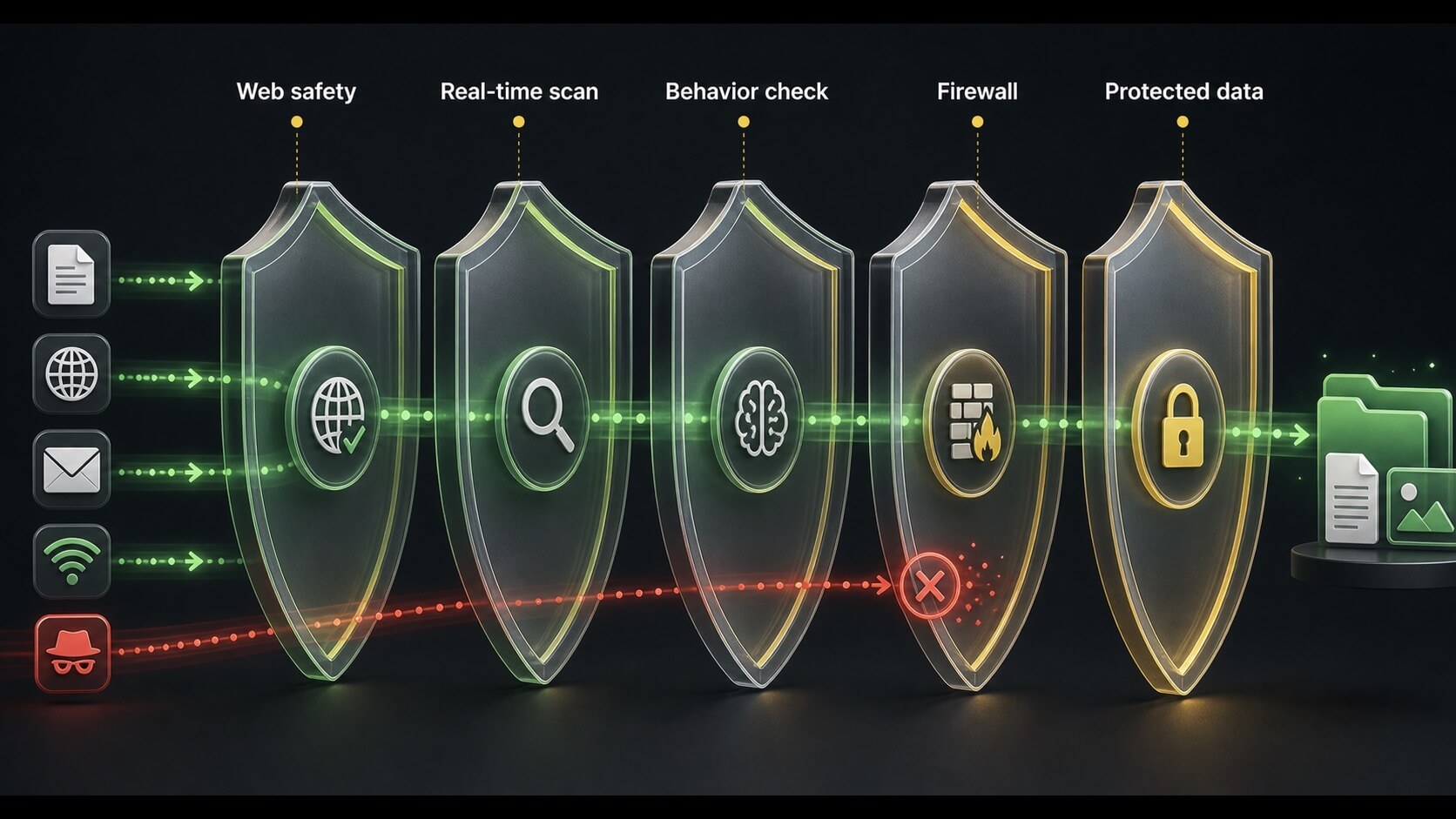
Norton's core protection monitors files, downloads, applications, and network activity for suspicious behavior. On-demand scans provide an additional check, while web and firewall features aim to stop threats before they reach sensitive files or accounts.

Diagram of web, real-time, behavior, and firewall checks filtering activity before it reaches protected files
Illustration: layered security checks address different stages between online activity and protected data. Actual controls vary by operating system and plan.

Real-time malware protection

Real-time protection checks files and activity while the device is in use. It is designed to identify known malware as well as suspicious behavior that may indicate a newer threat. You can also run quick, full, or targeted scans when a manual check is appropriate.

Live monitoring On-demand scans

Smart firewall

On supported desktop systems, the firewall monitors network communication and helps block unauthorized connections. It adds a useful layer around antivirus, although it does not replace secure router settings, operating-system updates, or careful account management.

Network traffic Connection control

Web and download safety

Browser-related protection can warn about known or suspected malicious sites, phishing pages, and dangerous downloads. These warnings are helpful, but newly created scam pages can still evade detection, so the sender and destination should always be checked.

Phishing warnings Download checks

Independent protection results

Independent antivirus laboratories periodically evaluate consumer security products, including Norton, using controlled malware, web-threat, false-positive, and performance tests. Results change by test period and platform, so a recent report is more useful than a permanent claim based on one strong result.

What lab tests can show

Controlled testing can compare how products react to widespread malware and recently discovered threats. It can also measure false alarms and system impact under a repeatable methodology.

What they cannot promise

No test proves that a product will stop every future attack. Results reflect the samples, settings, operating system, and test period used by that laboratory.

How to read a result

Look for consistent performance across several recent reports rather than relying on a single percentage. Protection, false positives, and device performance should be considered together.

VPN and Windows cloud backup

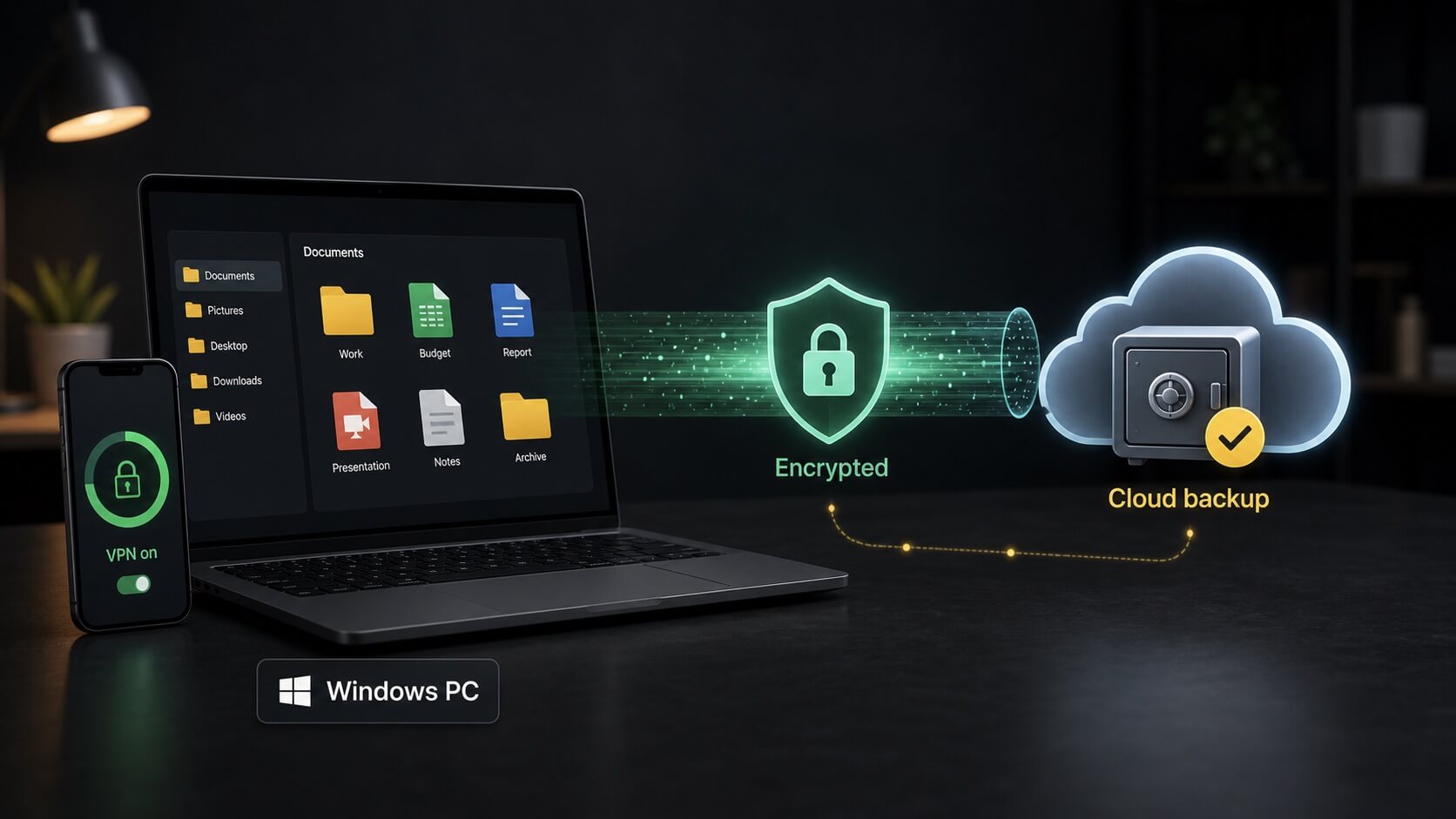
These features solve different problems. The VPN protects data in transit between your device and the VPN service, while cloud backup keeps copies of selected Windows files that may help after hardware failure, accidental deletion, or ransomware damage.

Illustration of devices using an encrypted VPN connection and a Windows computer backing up files to a secure cloud
Illustration: VPN encryption and Windows cloud backup are separate protections. Backup availability and storage allowances depend on the plan.

Secure VPN

Norton advertises an unlimited-data VPN with current Norton 360 plans. It can improve privacy on shared or public networks by encrypting traffic to the VPN server. It does not make you anonymous, remove all tracking, or make an unsafe website trustworthy.

Encrypted traffic Public Wi-Fi

Cloud backup

Cloud backup is intended for Windows PCs and the included capacity changes by plan. It can protect important documents and photos when configured correctly, but it should not be treated as the only copy of irreplaceable data.

Windows only Plan-based capacity

Ransomware recovery

A separate backup can make recovery easier if local files become encrypted or damaged. Antivirus may block many ransomware attempts, but maintaining tested backups remains important because no detection system is infallible.

File recovery Additional layer

Password and account security

Norton's password manager helps reduce password reuse, one of the most common account-security weaknesses. Its value depends on completing setup, importing or replacing existing credentials, and protecting the vault with a strong unique password.

Unique passwords

A password manager can generate and store different credentials for each account, limiting the damage when one service suffers a breach. Reusing one password across email, shopping, and financial accounts creates a much larger risk.

Browser and mobile access

Availability varies by supported browser and operating system. Check that your preferred browser and phone are supported before relying on the vault as your main credential manager.

Multi-factor authentication

A password manager does not replace multi-factor authentication. Enable MFA on email, banking, social, and other important accounts so a stolen password alone is less useful to an attacker.

Dark web and identity monitoring

Norton includes dark web monitoring with selected consumer plans, while broader LifeLock identity services are mainly offered through specific U.S. subscriptions. Monitoring may provide an early warning, but it cannot prevent every breach or guarantee that identity theft will not occur.

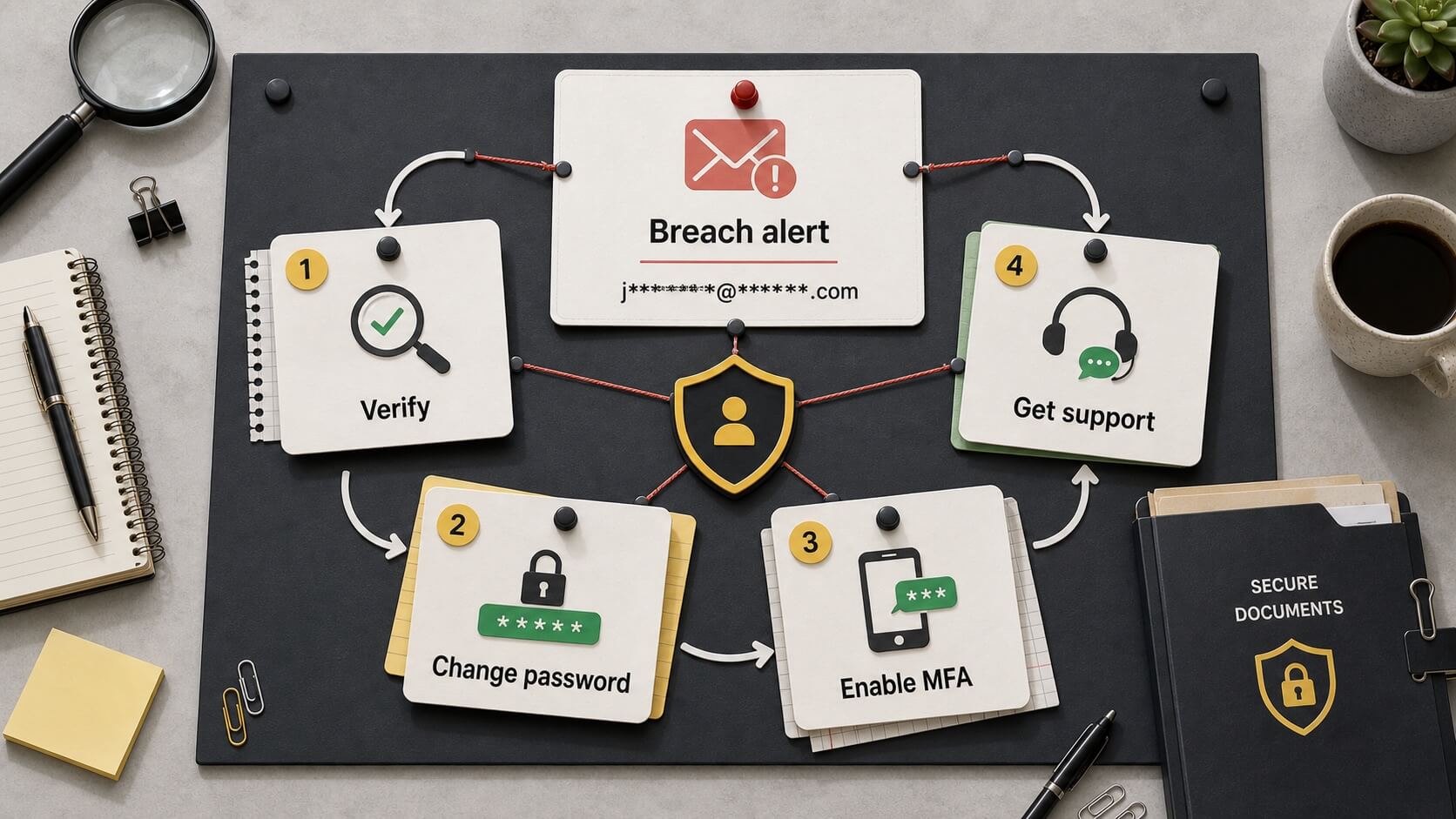
Top-down identity response workflow moving from a breach alert to verification, password change, multi-factor authentication, and support
Illustration: an identity alert should lead to verification and concrete account-security steps. Restoration and insurance-related benefits are plan- and region-dependent.

Dark web monitoring

You enroll selected information, such as an email address, and the service looks for matches in sources it monitors. If an alert appears, you should change affected passwords, review account activity, and secure the related email account.

Breach alerts Account response

LifeLock plan options

Eligible U.S. plans may add credit monitoring, identity restoration support, and insurance-related benefits. Coverage levels, bureaus monitored, exclusions, and reimbursement limits vary, so the current benefit summary and terms should be read carefully.

U.S. availability Plan conditions

Reasonable expectations

Monitoring is most useful as an alert system. It does not erase exposed data or stop someone from attempting fraud. Fast password changes, account review, credit freezes where appropriate, and direct contact with affected institutions may still be necessary.

Early warning Recovery steps

Parental controls and family use

Norton 360 Deluxe and selected higher tiers advertise parental controls and School Time tools. These features can help organize a child's online access, but they should support family rules and conversation rather than replace them.

Web supervision

Parents can use supported controls to review or manage categories of web access. Filtering is never perfect, and device-level restrictions can behave differently across Windows, Android, and iOS.

School Time

School Time is intended to reduce unrelated web distractions during learning periods while allowing access to approved educational resources. Its usefulness depends on compatible devices and thoughtful configuration.

Platform limitations

Norton states that parental controls are not supported on Mac. Before choosing a family plan, compare every household device with the current system requirements and feature-compatibility list.

What using Norton is like

Norton brings its main features into a central account and application, but a full setup takes longer than installing a basic antivirus. VPN, backup, password, dark web, and parental tools each need their own review and configuration.

Installation and dashboard

The dashboard provides access to protection status and included services. The number of modules can initially feel busy, although it also makes it easier to see which features have not yet been activated.

Central dashboard Guided setup

System performance

Real-time protection runs in the background, while full scans and backups may be more noticeable on older devices or slower storage. Scheduling heavier tasks outside active work hours can improve day-to-day comfort.

Background use Scheduled tasks

Cross-platform differences

Windows typically receives the widest set of Norton features. macOS, Android, and iOS versions have different controls because of platform restrictions, so a five-device license does not mean every device receives an identical toolset.

Windows Mobile and Mac

Norton advantages and tradeoffs

The suite delivers the most value when its additional services match your needs. Feature breadth is a strength, but it also makes plan comparison and initial setup more involved.

What we like

Strong feature breadth, an unlimited-data VPN in current Norton 360 plans, a password manager, dark web monitoring, and useful Windows backup options make Norton a convincing all-in-one suite.

What to consider

Cloud backup is for Windows, parental controls do not support Mac, identity benefits vary by country, and device counts change by plan. Renewal pricing may also be higher than the introductory offer.

Who may prefer another option

A lower-cost or free-first antivirus may suit you better if you protect one device and already use a separate VPN, password manager, backup service, and identity-monitoring provider.

Choosing a Norton plan

Product names, device allowances, backup capacity, and promotional prices can change. Confirm the current comparison table on Norton's official site before deciding.

Basic one-device needs

Compare the entry-level antivirus option if you only need core protection for one compatible computer and do not require a multi-device VPN, parental controls, or a larger backup allowance.

Core security One device

Several personal devices

Norton 360 Deluxe is currently advertised for up to five PCs, Macs, tablets, or phones and includes VPN coverage for those devices, plus plan-specific backup and family tools.

Up to five devices Household mix

Identity-focused coverage

Compare Norton 360 with LifeLock plans if you are in the United States and want broader identity and credit-related services. Review bureau coverage, restoration support, insurance terms, and device limits separately.

LifeLock options U.S. plans

Before you subscribe

Look beyond the first displayed price. A few minutes spent checking terms can prevent surprises after installation or when the subscription renews.

Introductory and renewal price

Check the price charged today, the length of the first term, whether automatic renewal is enabled, and the amount or pricing method expected at renewal. Discounts are often temporary.

Device and feature support

List the operating systems in your household and match them against the current plan. Pay particular attention to Windows-only backup, Mac parental-control limitations, and mobile feature differences.

Cancellation and refund terms

Review the current cancellation process, refund eligibility, trial conditions, and any requirements tied to automatic renewal benefits. Provider terms should control the final decision.

How we arrived at the 9.2 rating

Our editorial rating considers protection breadth, independent testing context, usability, privacy tools, device coverage, platform limitations, plan clarity, and cost-benefit value. It is not a laboratory certification and does not guarantee that Norton will stop every threat.

Protection and features

Norton earns strong marks for combining malware defense with firewall, web safety, VPN, password, monitoring, and Windows backup features in a mature consumer suite.

Layered tools Feature depth

Everyday value

The package can offer good value when several household devices need protection and the included VPN, backup, or family tools replace separate paid services.

Multi-device Combined services

Points deducted

Plan complexity, platform-specific omissions, region-limited identity benefits, and the difference between introductory and renewal pricing reduce clarity for buyers.

Plan complexity Renewal review
Is Norton more than an antivirus?

Yes. Current Norton 360 plans can combine antivirus, firewall, VPN, password management, dark web monitoring, and plan-dependent Windows backup and parental controls. The exact package varies by subscription and platform.

Does Norton include an unlimited VPN?

Norton advertises unlimited VPN data with current Norton 360 plans. Device coverage follows the selected plan, and a VPN does not make unsafe websites, weak passwords, or unpatched devices secure.

Does Norton cloud backup work on Mac?

Norton's cloud backup feature is intended for Windows PCs. Mac users should plan on a separate backup method and verify the latest platform requirements before purchasing.

Can Norton monitor the dark web?

Selected Norton plans include dark web monitoring for enrolled information. An alert indicates that you should investigate and secure the affected account; it does not prove identity theft and cannot remove the exposed information.

Are LifeLock features available everywhere?

No. The broader Norton 360 with LifeLock identity-protection lineup is primarily offered in the United States, and benefits differ by tier. Check regional availability and current legal terms.

Will Norton slow down my computer?

Background protection uses system resources, and full scans or backups may be noticeable on older hardware. Actual impact depends on the device, storage, operating system, active features, and task being performed.

Does Norton support parental controls on Mac?

Norton states that its parental-control feature is not supported on Mac. Supported functions also vary across Windows, Android, and iOS, so check each family device before subscribing.

Does this page show live pricing?

No. Plan names, promotional prices, renewal charges, device limits, and included features can change. Review the final details on Norton's official site before purchasing.