Disclosure: This site is reader-supported. We may receive compensation when you click links to products featured on our pages. This support helps us maintain and update our content. Learn more
Strong free starting point

Avast review

Avast offers a genuine free antivirus starting point with real-time malware and web protection, scanning, and network checks. Paid subscriptions can add stronger ransomware, firewall, remote-access, webcam, privacy, and multi-device features, although the names and contents of Avast plans can differ by country and change over time.

Our verdict on Avast

Avast remains one of the more capable free-first antivirus choices. The free edition provides meaningful real-time and web protection rather than functioning only as a scanner, while paid options add controls that are useful for ransomware, networks, remote access, and sensitive devices. Its main tradeoffs are frequent opportunities to upgrade, a product lineup that varies by region, and a privacy history that consumers should understand rather than ignore.

Useful free protection

Avast Free Antivirus includes core malware defenses, browser-related protection, and scanning tools. This makes it suitable for users who need basic ongoing security but are not ready to purchase a full suite.

Free antivirus Real-time shields

Practical paid upgrades

Paid versions can add features such as enhanced ransomware controls, firewall management, Remote Access Shield, Webcam Shield, and broader device coverage. Exact availability depends on the operating system and subscription.

Premium controls Multi-device options

Read the plan carefully

Avast may present Premium Security, Ultimate, Avast One, or modular combinations depending on location and current offers. VPN and cleanup products should not be assumed to be part of every antivirus plan.

Regional lineup Bundle details

Free antivirus and Smart Scan

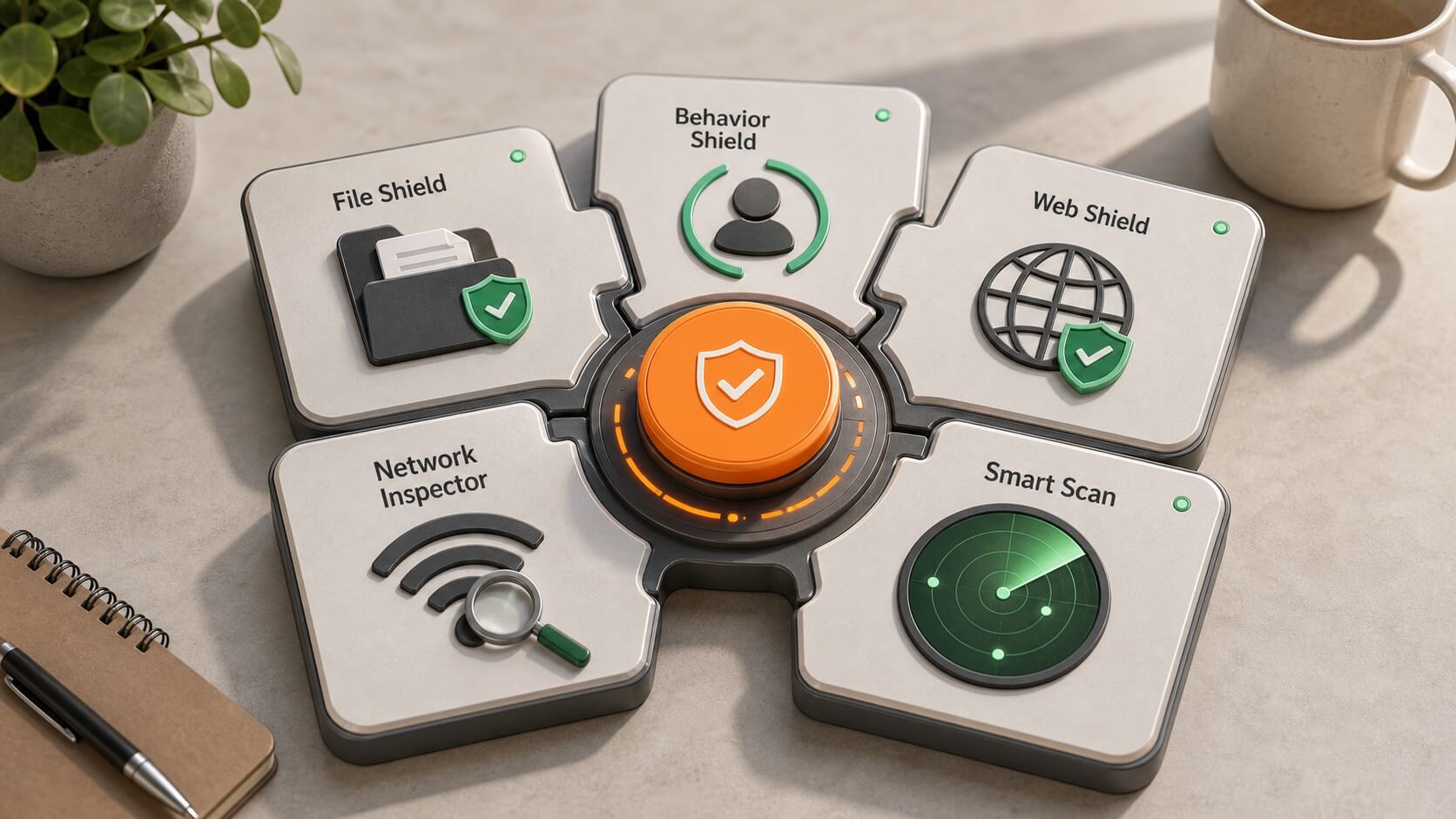
Avast's free product is built around several always-on shields plus manual checks. Smart Scan brings common checks together, but users should still understand what each alert means before installing an upgrade, changing a setting, or removing a file.

Modular security toolkit showing File Shield, Behavior Shield, Web Shield, Network Inspector, and Smart Scan
Illustration: Avast combines several focused shields with Smart Scan. Actual free features and controls vary by platform and product version.

File and behavior monitoring

File Shield checks files when they are opened, saved, or run, while behavior-based protection looks for suspicious activity that may indicate an unfamiliar threat. These layers complement each other but cannot guarantee detection of every attack.

File Shield Behavior monitoring

Web and email defenses

Web Shield is designed to inspect risky web traffic and downloads. Mail-related protection can scan supported email activity on desktop systems, but phishing judgment and multi-factor authentication remain important.

Web Shield Download checks

Smart Scan results

Smart Scan may report malware, browser risks, network issues, outdated software, privacy concerns, or performance opportunities. Some recommended fixes can require a paid product, so distinguish actual security findings from optional upgrade suggestions.

Combined scan Review findings

Independent testing context

Avast is regularly included in independent antivirus testing. Recent reports can help compare malware protection, false positives, and system performance, but each result applies to a particular version, operating system, configuration, sample collection, and test period.

Protection tests

Laboratories use controlled collections of widespread and newer threats to measure blocking and detection. Consistent results across multiple recent reports are more informative than one isolated percentage.

False alarms

Strong blocking should be considered alongside false positives. A product that incorrectly identifies legitimate software or websites can create disruption even when its raw detection rate looks impressive.

Performance measurements

Lab tests estimate the impact on browsing, application launches, installation, and file operations. Your experience will still depend on device age, storage, background software, scan type, and enabled features.

Ransomware and sensitive-file protection

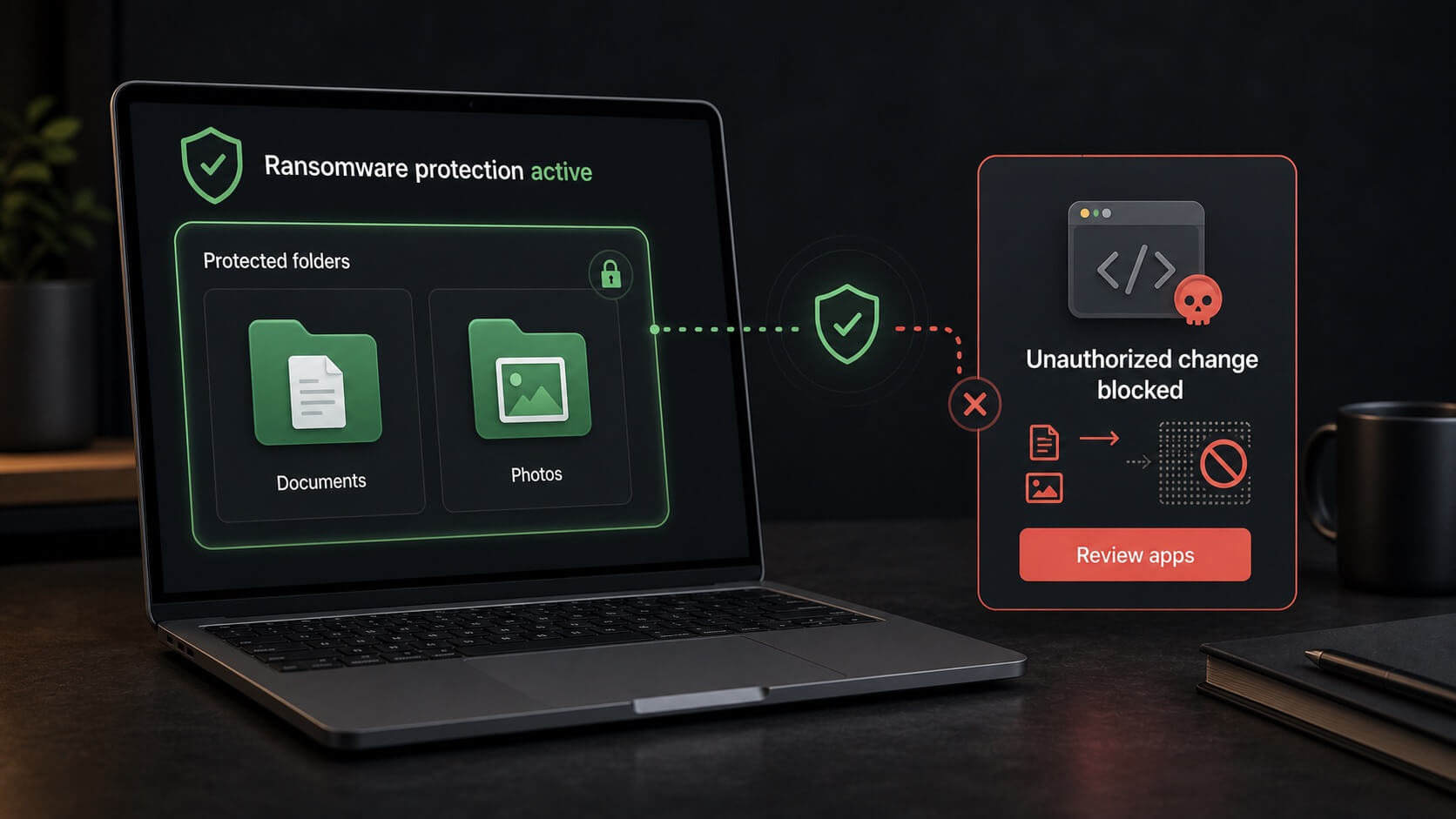
Paid Avast products can add stronger controls around documents, photos, and other protected folders. The goal is to prevent untrusted applications from modifying important files without permission, adding a layer beyond ordinary malware detection.

Illustration of protected document and photo folders blocking an unauthorized file change
Illustration: protected-folder controls can block unauthorized changes. They do not replace offline or versioned backups and cannot guarantee recovery from every ransomware incident.

Ransomware Shield

Ransomware Shield can restrict which applications are allowed to change protected files. Review the protected folders and permitted applications so legitimate editing, photo, backup, and synchronization software continues to work.

Protected folders Application control

Sensitive Data Shield

Selected paid Windows products may scan for files likely to contain sensitive personal information and limit access by untrusted applications. Results should be reviewed because automated classification may not identify every important document.

Sensitive files Windows feature

Backups still matter

Antivirus and folder protection reduce risk but do not replace backups. Keep important data in at least one separate location, ideally with version history or an offline copy that ransomware cannot modify from the infected device.

Recovery planning Separate backups

Network, firewall, and device access

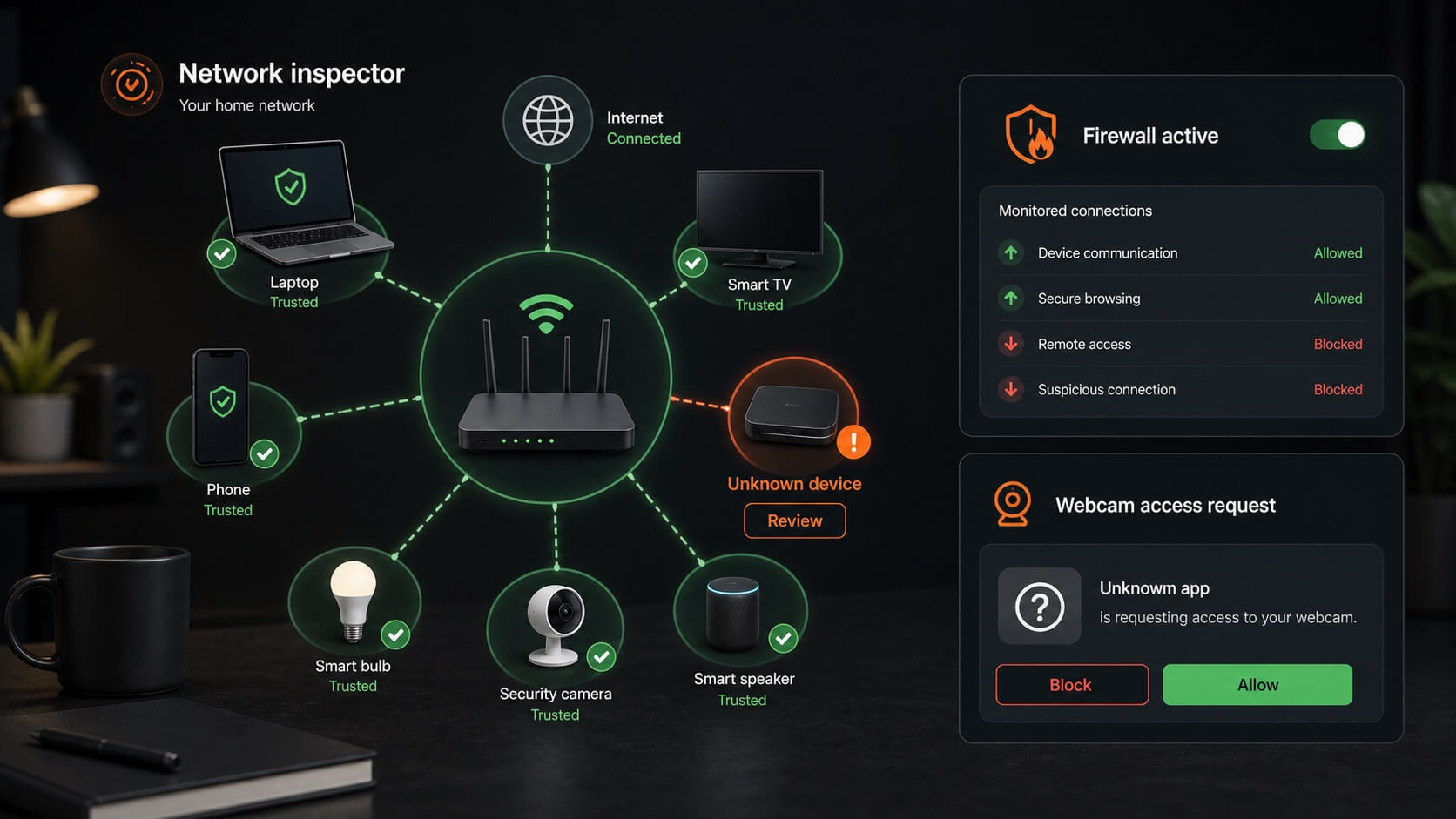
Avast includes tools that inspect the local network and, in paid plans, can provide deeper control over connections and sensitive hardware. These features are most useful when you review alerts rather than automatically trusting or blocking every unfamiliar item.

Illustration of a home network inspector, firewall controls, and a webcam access request
Illustration: network and access controls help identify unusual devices or requests. Availability and behavior differ by operating system and subscription.

Network Inspector

Network Inspector can review the local network for connected devices and certain configuration weaknesses. An unknown device deserves investigation, but device names can be incomplete or misleading, so compare hardware addresses and router records before taking action.

Wi-Fi review Connected devices

Firewall and remote access

Paid desktop plans can include enhanced firewall controls and Remote Access Shield. These tools are intended to monitor network connections and reduce unauthorized remote access, but secure router settings and strong account credentials remain essential.

Connection monitoring Remote access

Webcam protection

Webcam Shield can notify or control which applications use the camera on supported Windows systems. It cannot protect an unrelated camera or smart-home device that is not managed through the computer.

Camera permissions Supported Windows PCs

Phishing, fake sites, and online scams

Avast's web protection aims to stop known malicious downloads and risky destinations, while selected paid features may add stronger protection against fake websites. No reputation database can identify every newly registered phishing page.

Website reputation

Warnings can help when a link points to a known malicious or suspicious destination. They are particularly useful for unexpected delivery, account, invoice, and password-reset messages.

Fake-site protection

Premium features may provide additional checks intended to reduce redirection to fraudulent banking, shopping, or login pages. Confirm the exact feature name and supported platform in the current plan.

Your role

Open important accounts through an official app or saved bookmark, check the complete domain, avoid urgent payment requests, and use unique passwords with multi-factor authentication.

VPN, tracking, and cleanup products

Avast offers privacy and performance tools through Avast One, Avast Ultimate, regional bundles, or separate subscriptions. The exact lineup changes, so a free antivirus installation should not be treated as proof that VPN, anti-tracking, or cleanup services are included.

SecureLine VPN

Avast's VPN can encrypt traffic between your device and the VPN server, which is useful on shared Wi-Fi. It does not make you anonymous, stop all browser tracking, or protect credentials entered into a fraudulent website.

Encrypted connection Separate or bundled

AntiTrack and browser privacy

Anti-tracking tools may reduce some profiling techniques, but websites can still use logins, first-party data, browser storage, and other signals. Check browser compatibility and whether the feature requires a separate subscription.

Tracking controls Browser limits

Cleanup utilities

Cleanup tools can identify temporary data, unused applications, or startup items. Review proposed changes before removal because deleting browser data or disabling software can sign you out, remove settings, or interrupt useful services.

Storage review Manual approval

Privacy history and current context

A complete Avast review should mention its past data practices. In 2024, the U.S. Federal Trade Commission finalized an order requiring Avast to pay $16.5 million and restricting the sale or licensing of browsing data for advertising after alleging that browsing information had been collected and sold through its former Jumpshot subsidiary. Avast closed Jumpshot in 2020.

Why this matters

Antivirus software receives deep access to devices and network activity, so privacy governance is part of product trust. The historical conduct is relevant even though the associated Jumpshot business was shut down.

What users can review

Read the current privacy policy, review optional data-sharing and analytics settings during installation, and use account controls to limit information that is not necessary for security or service operation.

Balanced assessment

The FTC action does not by itself measure current malware protection, and strong antivirus results do not erase privacy concerns. Both security effectiveness and data handling should inform the decision.

What using Avast is like

Avast's interface is approachable, with protection status and Smart Scan placed prominently. Free users should expect some prompts for paid tools, and scan results may include both security issues and features that require an upgrade.

Installation and setup

Review installation choices carefully, allow the threat database to update, and confirm that the real-time shields you want are enabled. Avoid installing optional products unless you have decided they are useful.

Setup choices Shield status

Alerts and upgrade prompts

Avast separates free and paid features inside the same experience, so some recommendations lead to subscriptions rather than free fixes. Read the finding and product name before treating every alert as an urgent threat.

Free vs paid Alert review

System performance

Real-time protection runs continuously, while full scans and network checks may use more resources. Actual impact depends on device age, storage, background software, scan settings, and enabled modules.

Background use Scheduled scans

Platform and device differences

Avast supports major desktop and mobile platforms, but the protections are not identical. Desktop systems permit deeper file and network monitoring, while Android and iOS impose different limits on how security apps inspect the device.

Windows

Windows generally receives Avast's widest range of antivirus, ransomware, firewall, remote-access, webcam, sensitive-data, and cleanup controls. Some features still require specific paid products.

macOS

Mac protection includes malware and web-focused tools, but feature names and availability differ from Windows. Do not assume a multi-device license provides identical controls on both systems.

Android and iOS

Mobile applications focus on platform-permitted web, privacy, network, and device-security checks. iOS security apps cannot scan the complete system in the same way as Windows antivirus.

Avast advantages and tradeoffs

Avast's free protection is its clearest advantage. The paid ecosystem adds useful controls, but buyers need to distinguish core antivirus, premium security, VPN, anti-tracking, and cleanup subscriptions.

What we like

The free edition provides meaningful ongoing protection, Smart Scan is easy to understand, and the paid products add sensible ransomware, network, remote-access, and webcam controls.

Strong free tier Useful upgrades

What to consider

Upgrade prompts can be frequent, regional plan differences make comparison harder, and Avast's historical browsing-data practices remain relevant to privacy-conscious users.

Upgrade prompts Privacy history

Who may prefer another option

Another product may suit you better if you want identity-restoration services, a quieter interface with fewer upgrade prompts, or one clearly defined subscription containing antivirus, VPN, backup, and family tools.

Identity services Simpler bundle

Before choosing a plan

Avast's product presentation can vary by country and campaign. Check the final order summary and feature table rather than relying on a familiar product name alone.

Free or paid

Start by listing what the free edition already covers on your device. Pay for an upgrade only when the additional ransomware, firewall, remote-access, webcam, VPN, privacy, or multi-device features solve a real need.

One device or household

Confirm the exact number and type of supported devices. A multi-device license can cover several systems, but available features still differ between Windows, Mac, Android, and iOS.

Billing terms

Review the first-term price, subscription length, automatic renewal, later renewal charge, refund conditions, and whether separate Avast products have independent billing dates.

How we arrived at the 9.0 rating

Our editorial score considers core protection, independent testing context, free-tier value, usability, web and network tools, platform coverage, privacy history, plan clarity, and overall cost-benefit value. It is not a laboratory certification or a guarantee that Avast will stop every threat.

Protection and accessibility

Avast earns strong marks for offering real-time free protection and clear scanning tools, with additional paid defenses for ransomware, networks, remote access, and sensitive hardware.

Core security Free access

Upgrade flexibility

Users can begin with free antivirus and add broader security or privacy tools later. This flexibility is useful when the paid feature and device limits are clearly understood.

Flexible start Optional extras

Points deducted

Prominent upgrade prompts, changing regional bundles, separately sold tools, and the FTC privacy case reduce simplicity and trust compared with an otherwise capable protection package.

Plan complexity Trust considerations
Is Avast Free Antivirus real-time protection?

Yes. Avast's free desktop antivirus provides core real-time shields, not only manual scanning. Feature availability changes by platform, and premium controls such as advanced ransomware, firewall, remote-access, or webcam protection may require payment.

What does Smart Scan check?

Smart Scan combines several checks and may report malware, browser risks, network issues, outdated software, privacy concerns, or performance opportunities. Some proposed fixes can lead to paid Avast products.

Does Avast include ransomware protection?

Core antivirus can detect many ransomware files and behaviors, while stronger protected-folder controls are offered with selected paid products. No antivirus can guarantee prevention or recovery, so maintain separate backups.

Does Avast include a VPN?

SecureLine VPN may be bundled in Avast One, Ultimate, or another regional offer, or sold separately. Do not assume it is included with Avast Free Antivirus or every Premium Security subscription.

Can Avast inspect my home Wi-Fi?

Network Inspector can identify connected devices and certain network concerns. Device labels can be incomplete, so verify unfamiliar hardware through your router before blocking or removing it.

What was the Avast FTC privacy case?

In 2024, the FTC finalized an order requiring Avast to pay $16.5 million and restricting the sale or licensing of browsing data for advertising after allegations involving its former Jumpshot subsidiary. Avast closed Jumpshot in 2020.

Will Avast slow down my computer?

Real-time shields use system resources, and full scans may be noticeable on older hardware. Actual performance depends on the device, storage, operating system, enabled features, and other background software.

Does this page show live pricing?

No. Free and paid feature lists, product names, promotions, device allowances, and renewal prices can change. Verify current details and billing terms on Avast's official site before subscribing.